

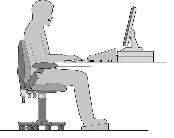
How should I set my desk up?
Generally:Follow these steps to correct the most common causes of pain at work:
1. Move your chair close to the desk and sit back into the seat. Adjust your chair back so that your upper body is relaxed and supported. Raise your seat height. You should have your elbows level or just above the surface of the desk.
2. Use a foot rest if your feet do not rest flat on the floor once you have adjusted your chair as above.
3. Adjust your monitor. The top of the screen should be just below eye level. Bring the monitor to a comfortable distance from your chair. For most people, it should be directly in front of the chair at about an arm's length distance.
4. Position your keyboard and mouse towards the front of the desk.
5. Place documents sensibly, and preferably using a document holder. For most of us, this should be between the keyboard and the monitor, to minimise head twisting and tilting. For copy typists, this may mean moving the monitor to one side and placing the document holder further back from the keyboard and centrally to the chair.
6. Position the phone sensibly. Move it so that you can pick up the receiver with your non-dominant hand, without over-reaching. Better still, use a headset.
7. Clear the clutter from under and on the desk.
8. Raise your laptop screen. Laptops are best used with a separate mouse and keyboard. Ideally, use a laptop stand to tilt and raise the screen and position it at a comfortable viewing distance.
9. Don't just sit there - move! If possible, stand up when you can. Our bodies are not designed to sit in a static position for long periods. Even getting up to retrieve documents from the printer, or to get a glass of water, or when talking on the phone will help enormously.
How can my business afford to buy special equipment?
For many businesses, the cost of buying ergonomic equipment may seem prohibitive. The reality is that the cost of NOT supplying ergonomic equipment can be far higher, in terms of lower productivity, loss of work days or even prosecution, if health and safety laws are broken.The equipment we sell is of a good quality, and will last much longer than products with a lower price tag and a shorter warranty.
We are also prepared to discuss leasing terms for a lot of the equipment we supply.
What causes pain at work?
OK, so if your boss is not a good one, you may end up with a pain in the neck! But that's not what we mean.A large proportion of the population spend a lot of time sitting at desks in front of computers and telephones. Frequently the desk, chair and phone and computer will be standard issue, and typically the person will not have been shown how to set up their workstation to suit their own needs. As humans are not all a standard size and shape, these factors can lead to bad posture and bad backs. There are many bad habits people will adopt in these circumstances; here are some of the common ones.
1. Sitting with the chair too low and too far from the desk. This leads to a slouched posture and hunched shoulders with no support from the chair back. The head is tilted forward. All these can cause pain in the arms and torso. Feet are often hooked round the chair base restricting blood circulation in the legs.
2. Sitting with the chair too low. Shorter people often experience this if they set their chair so that their feet remain flat on the floor. If the chair is too low for the desk then the arms will be stretched forward (or sideways), and/or the shoulders will be raised. Muscles will then be tensed unduly leading to stiffness and fatigue.
3. Setting the computer monitor too low. The head will be tilted downwards. This causes the whole body to lean forwards, moving away from the support of the chair and leading to slouching.
4. Multi-tasking. This can often lead to 'necking' the phone, to free up the hands for typing or looking through files. This places undue strain on the neck muscles.
5. Having clutter under the desk. This can mean that the person has to twist.
6. Using a laptop. Laptop use is a major cause of problems, causing poor posture which in turn leads to back, head and neck pain.
7. Having the desk too low. Taller people can often be hunched by the desk and all the equipment being too low. Legs are over-bent causing strain and stiffness.
8. Having equipment too far away for comfort. If the monitor is too far away, either the person leans forward, or they squint. Having phones, keyboards and mice too far away causes over-stretching and over-reaching.
9. Sitting too long. The human body was not built for long periods of relative inactivity and not constructed to conduct repetitive tasks!
VAT Exemption
We charge V.A.T. on all goods shipped to UK addresses at the standard rate of 20%. This is a legal obligation. If you are buying goods to reduce the impact of disabilities, you may find that some goods you are buying elsewhere (specifically designed to address the needs of disabled people) may be VAT-exempt. However, because all of our products are also suitable for use by people without disability, the exemption does not apply to our range and we must charge VAT. If you believe that your circumstances mean you are eligible for the VAT exemption, we suggest you check with your local HMRC department before contacting us by phone or email to place your order.
Student Support
This image may look familiar. We see it all the time, yet this common situation may cause a lot of physical problems in years to come.If you are a student, you should try to use your laptop ergonomically. By this we mean:
- Use it on a desk on a laptop stand that raises the screen to about level with your eyes.
- Keep the screen about an arm's length away from your eyes
- Use a separate mouse and keyboard
- Sit in a supportive chair where you are not having to lean forward with your back unsupported
- Adjust your chair to your body
This may sound like overkill - but if you regularly study like the student on the right, you will most likely end up with physical problems later in life.
We stock several types of laptop stand, mice and keyboards that can help you sit comfortable and be more productive - so you need fewer hours at the computer to get your work done so you can have some fun at your university college or school.
Why is Lundia shelving so strong?
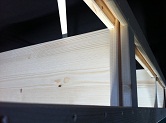
A distinctive feature of Lundia’s solid timber shelving systems is the special shelfdesign. The points carrying the heaviest load are reinforced, which means that a
Lundia shelf can carry 175kg in weight, with a maximum of 580kg per shelving bay,
regardless of the shelf size.
Both ends of the Lundia shelf are reinforced with strong end angles integrated into
the wood. These prevent the shelf from buckling and increase its carrying capacity.
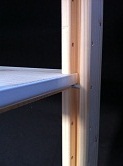
Grooves in the Lundia uprights channel the weight into the middle of the upright
column, while the corner notches in the shelves help guide the end angles firmly
into place in the upright grooves. In this way, the weight on each shelf is transferred
to the upright through the end angles and shelf support pins, ensuring superior
strength and flexibility.
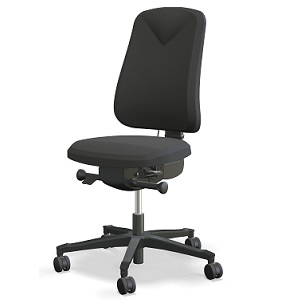
How do I clean my Salli Chair
LeatherVaccum Clean regularly. Leather stays clean and in good condition longer if wiped regularly with a damp cloth. Clean stains immediately. Use a damp cloth or paper towel with some water or mild cleanser. Special leather conditioners can also be used. Some dyed textiles might stain light coloured leather.
Artificial Leather
Remove a spot as quickly as possible
PUxx is a 100% waterproof product. PUxx will retain its colour by wiping occasionally with a warm cloth, especially on the parts that contact the body. PUxx can be easily cleaned and disinfected by almost any type of detergents such as ethanol, hydrogen peroxide and chlorine solutions. Follow the instructions of the manufacturer of the disinfectant. Never clean PUxx with solvents.
Wool Fabric
Vacuum regularly. Wipe with a damp cloth using soap and water or use ulpholstery shampoo. For deeper cleaning use steam or professionally dry clean. If usinga cleaner do a small test area initially.
Polyurethane
Remove stains quickly by using slightly alkaline washing agents (max 5% alcohol). Wipe the surface with a moist cloth and lukewarm water and wipe dry if necessary. Do not use strong alkalis or bleaches such as chlorite, acetone, xylene or strong vinegar.
Recently Viewed
New Products
© 2020 Lundia (UK) Ltd


